EMACS
Goal
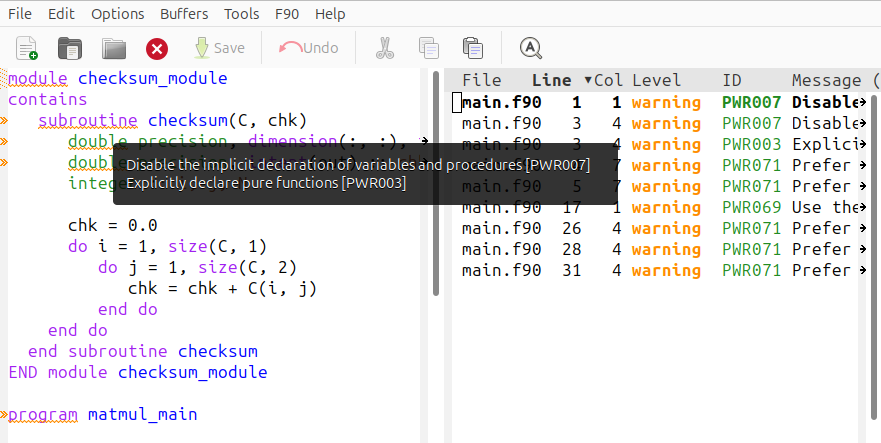
Integrate codee with EMACS to visualize the Codee checkers.
Prerequisites
- You should have a
init.elfile in your.emacsor.emacs.ddirectory. - Install the
flycheckEMACS package. - Basic familiarity with EMACS commands and
flycheckusage. - Make sure
codeeis accesable from EMACS shell, you can add thecodeepath to your configuration file.
Configure EMACS for codee
Add the following configuration to your .init.el configuration file:
(require 'flycheck)

(flycheck-define-checker fortran-codee
  "Display Codee checkers with flycheck."
  :command ("codee" "checks" "-p" "/home/user/codee-demos/Fortran/MATMUL/compile_commands.json
  :error-patterns
  ((warning line-start
            (file-name) ":" line ":" column
            " [" (id (one-or-more (not (any "]")))) "] "
            "(level: " (one-or-more (not (any ")"))) "): "
            (message) line-end))
  :modes (fortran-mode f90-mode))

(setq flycheck-checkers '(fortran-codee))

(provide 'flycheck-fortran-codee)
In the command section of the flycheck-define-checker fortran-codee function you
need to specify the path to the compile_commands.json of your project so Codee can
analyze it.
This file will be autodetected by EMACS. Once you start the program, you need to
select fortran-codee as your default Fortran analyzer when running EMACS.
This can be verifyed using the flycheck-verify-setup command. The analysis
will be made again each time the current file is saved.