Vim
Goal
Vim setup to view Codee checks as editor diagnostics.
Prerequisites
Ensure you have:
- Codee installed on your system.
- A
compile_commands.jsoncompilation database (You can check the Basic Workflow) - Vim >= 8.0, basic familiarity with how to configure it and
filetype onset so that C, C++ and Fortran file types are autodetected
Install ALE
To easily display Codee checkers in VIM, install the
ALE extension using its
installation
instructions.
Configure ALE for Codee
Add the following configuration to your .vimrc Vim configuration file:
let g:ale_codee_executable = 'codee'
let g:ale_codee_checks_options = 'checks --json'

" Register Codee for C, C++, and Fortran files
let g:ale_linters = {
\   'c': ['codee'],
\   'cpp': ['codee'],
\   'fortran': ['codee'],
\}

" Function to parse severity levels
function! s:ParseSeverity(checkid) abort
    if a:checkid =~# '^RMK\d\{3}'
        return 'I'
    elseif a:checkid =~# '^PWR\d\{3}'
        return 'W'
    elseif a:checkid =~# '^PWD\d\{3}'
        return 'E'
    endif
    return 'W'
endfunction

" Function to parse location (line:column)
function! s:ParseLocation(location) abort
    let l:matches = matchlist(a:location, '\(.*\):\(\d\+\):\(\d\+\)$')
    if empty(l:matches)
        return {'line': 0, 'column': 0}
    endif
    return {
    \   'line': str2nr(l:matches[2]),
    \   'column': str2nr(l:matches[3])
    \}
endfunction

" Define the Codee output handler for ALE
function! HandleCodeeOutput(buffer, lines) abort
    if empty(a:lines)
        return []
    endif

    " Join the lines and parse JSON
    let l:output = join(a:lines, '')
    let l:json_data = json_decode(l:output)

    if type(l:json_data) != v:t_dict || !has_key(l:json_data, 'Checks')
        return []
    endif

    let l:diagnostics = []

    for l:check in l:json_data.Checks
        let l:location = s:ParseLocation(l:check.Location)
        if l:location.line > 0
            call add(l:diagnostics, {
            \   'lnum': l:location.line,
            \   'col': l:location.column,
            \   'end_col': l:location.column,
            \   'text': l:check.Title . ' - ' . l:check.Suggestion,
            \   'type': s:ParseSeverity(l:check.Check),
            \   'code': l:check.Check,
            \})
        endif
    endfor

    return l:diagnostics
endfunction

" Define the Codee linter configuration
call ale#linter#Define('c', {
\   'name': 'codee',
\   'executable': g:ale_codee_executable,
\   'command': g:ale_codee_executable . ' ' . g:ale_codee_checks_options . ' %s',
\   'callback': 'HandleCodeeOutput',
\   'output_stream': 'stdout',
\   'lint_file': 1,
\})

" Define the same linter for C++ and Fortran
call ale#linter#Define('cpp', {
\   'name': 'codee',
\   'executable': g:ale_codee_executable,
\   'command': g:ale_codee_executable . ' ' . g:ale_codee_checks_options . ' %s',
\   'callback': 'HandleCodeeOutput',
\   'output_stream': 'stdout',
\   'lint_file': 1,
\})

call ale#linter#Define('fortran', {
\   'name': 'codee',
\   'executable': g:ale_codee_executable,
\   'command': g:ale_codee_executable . ' ' . g:ale_codee_checks_options . ' %s',
\   'callback': 'HandleCodeeOutput',
\   'output_stream': 'stdout',
\   'lint_file': 1,
\})

" Enable ALE to run on file save and when leaving insert mode
let g:ale_lint_on_text_changed = 'never'
let g:ale_lint_on_insert_leave = 1
let g:ale_lint_on_enter = 1
let g:ale_lint_on_save = 1
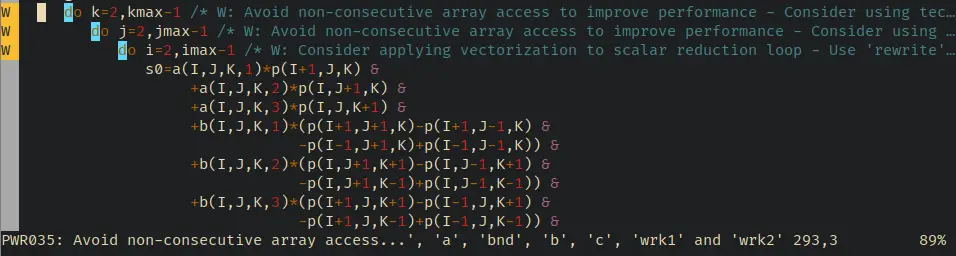
Navigate Codee checkers with ALE
You can navigate between checkers with :ALENext and :ALEPrev. You can
display more information about a particular checker with :ALEDetail.